home › Forums › Devices, Platforms & Apps › Devices in General › Googlebook OS Problems Show Why Android Desktop Matters
- This topic has 0 replies, 1 voice, and was last updated 3 minutes ago by
 scamboy.
- Posts
- Google’s new Googlebook laptops were supposed to bring Android into the world of personal computers. Instead, early reviews have exposed an uncomfortable problem. Google is asking consumers to pay premium laptop prices for an operating system that still struggles with basic desktop tasks.
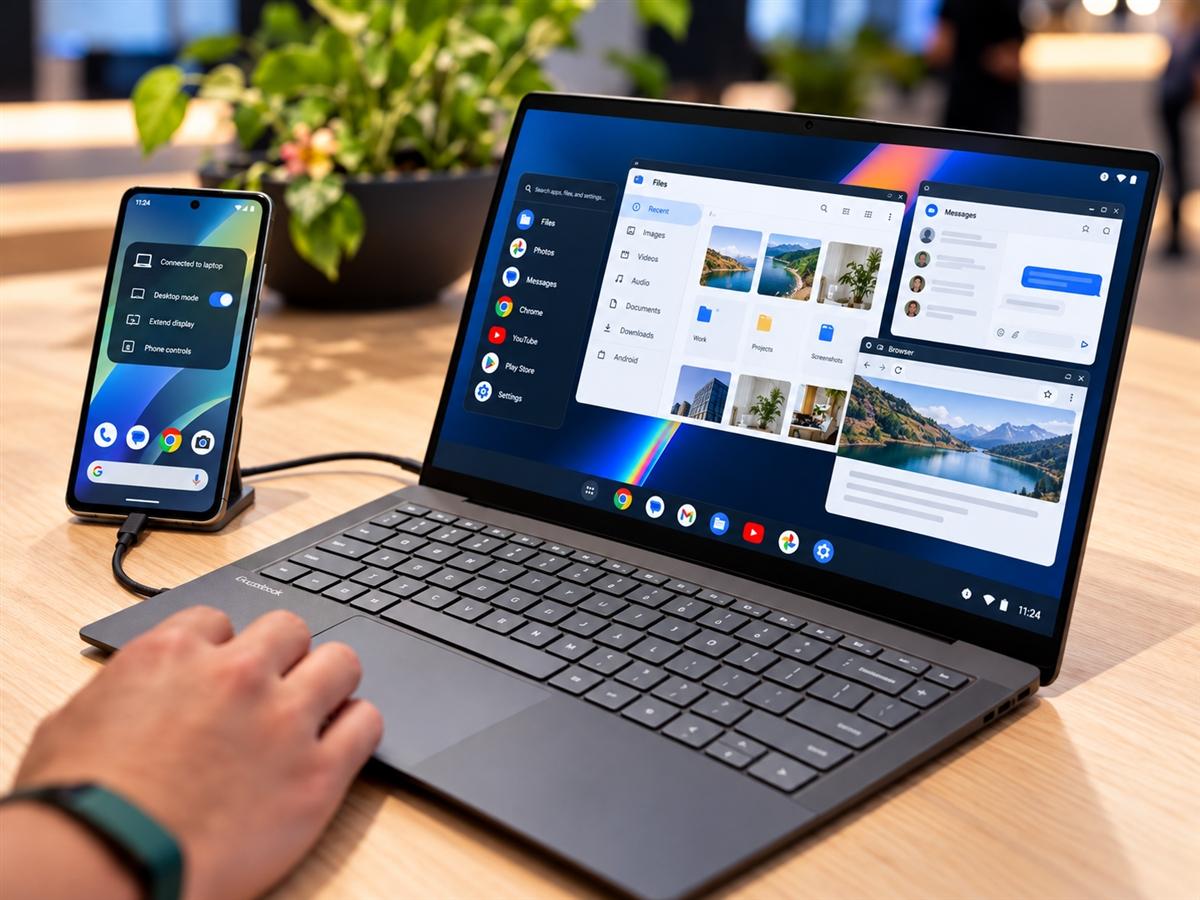
Starting at US$899, Googlebooks compete directly with Windows laptops and Apple’s MacBooks. The hardware is impressive, but is the software good enough to justify buying another computer?
More importantly, has Google overlooked a better opportunity? Rather than trying to make Android work on another expensive laptop, why not make it easier for people to use the Android smartphones they already own as personal computers?
Samsung DeX has demonstrated this idea for years. Google’s own Android desktop mode is now moving in the same direction.
Perhaps this is where Google should be concentrating more of its efforts.
Googlebook OS Still Feels Like Android on a Laptop
The first Googlebook laptops launched in October 2026, with models from Acer, ASUS, Dell, HP and Lenovo.
Google promised an Android-based laptop experience with access to Google Play applications, Gemini AI features and closer smartphone integration. Yet early reviews suggest the operating system is far from ready to replace Windows or macOS for many users.
In its review published on 16 October, Ars Technica found that Android applications often lacked proper keyboard and mouse support. Some applications behaved like enlarged smartphone apps instead of software designed for a laptop.
File management is another weakness. Googlebook’s Files application lacks some basic features available in Windows File Explorer and macOS Finder, including support for conventional network file shares.
Even Google’s own services present an unusual situation. Gmail and Google Calendar primarily use web applications on Googlebook instead of dedicated Android desktop applications.
There is nothing inherently wrong with web applications. Gmail already works well in a browser. But Windows, macOS and ChromeOS can also access the same services.
That leaves a simple question. What exactly does Googlebook offer that makes it worth purchasing over an established laptop?
Intel and Qualcomm Googlebooks Add Another Complication
Googlebook OS also runs on two different processor architectures.
Some models use Intel processors, while others are powered by Qualcomm Snapdragon chips.
Most Android smartphones use Arm-based processors, making Qualcomm’s architecture a more natural match for many existing Android applications.
Intel Googlebooks use compatibility technology to run applications originally developed for Arm processors. Google has stated that 96.6% of more than 10,000 popular Google Play applications work properly on Intel Googlebooks. This indicates that most popular applications are supported.
However, Google also acknowledges that some complex applications and games may need additional optimisation.
For consumers, this creates another consideration when purchasing a Googlebook. A person buying an Android laptop should not have to worry about whether a favourite Android application will behave differently depending on the processor inside the computer.
Compatibility is not just about whether an application opens. It also includes performance, desktop controls and reliability.
Googlebook Phone Mirroring Should Be Much Simpler
One of Googlebook’s biggest attractions is its promise of closer integration with Android smartphones. Google’s Better Together features allow compatible phones to share files, notifications and applications with Googlebook laptops.
However, the experience comes with restrictions.
Cast My Apps requires a compatible smartphone running Android 17 or later. Both devices must also be connected to the same Wi-Fi network, with other connectivity requirements satisfied. That may work at home, but public and corporate Wi-Fi networks often restrict communication between connected devices.
A feature known as client isolation can prevent a Googlebook from communicating directly with a smartphone, even when both devices are connected to the same wireless network.
VPN services and certain network configurations can also interfere with connectivity.
Why should users need to understand Wi-Fi network settings simply to access their smartphone applications on a laptop?
A phone-to-laptop experience should ideally support straightforward wired connections and alternative wireless methods that do not depend entirely on the local Wi-Fi network.
Googlebook’s phone integration also launched with compatibility gaps involving Samsung Galaxy smartphones, although Google began rolling out additional support for Samsung devices running One UI 9 and Android 17 in October.
These restrictions weaken one of Googlebook’s main reasons for existing.
Samsung DeX Already Shows Another Way
There is a different approach to Android computing, and Samsung has demonstrated it for years.
Samsung DeX allows compatible Galaxy smartphones to connect to an external display and operate in a desktop-style environment. Users can open supported Android applications in multiple windows, connect a keyboard and mouse, and carry out everyday computing tasks.
The important difference is that the smartphone itself does the computing.
There is no need for another processor, a separate operating system installation or another set of locally stored applications. The smartphone already contains the processor, memory, storage and mobile connectivity.
Imagine connecting an Android smartphone to a laptop-style accessory containing only a display, keyboard, trackpad, battery and ports.
The phone would power the entire experience.
Products such as NexDock have already explored this concept, although compatibility and software support remain limited.
For people who mainly use web browsers, email, messaging and basic productivity applications, this could provide an alternative to purchasing a separate computer.
Of course, Samsung DeX cannot replace every Windows or macOS application. Professional software, demanding workloads and some peripheral devices still require conventional computers.
But the underlying concept deserves greater attention.
Google Already Has Android Desktop Mode
Google does not have to develop this idea entirely from the beginning.
In March 2026, Google announced that connected-display desktop functionality had reached general availability with Android 16 QPR3.
Developed in collaboration with Samsung, the feature allows supported Pixel and Samsung smartphones to connect to external monitors and run Android applications in resizable windows. The interface includes a taskbar, multitasking and support for keyboards and mice.
This is an important development because it brings desktop functionality directly into Android.
However, it remains available only on supported devices. Some smartphones lack the hardware required to output video to external displays, while many Android applications still need better support for large screens.
Google should make wider compatibility and desktop application quality major priorities.
A proper Android desktop environment should provide reliable multitasking, better file management, keyboard shortcuts, external storage support and consistent application behaviour.
These improvements would benefit smartphone users, tablets and Android laptops alike.
Why Buy Another Laptop When Your Phone Could Power One?
Today’s Android smartphones are already powerful computers.
Many premium models contain capable processors, substantial memory and fast storage. Yet much of that computing power is used only through a relatively small touchscreen.
A laptop-style accessory could make better use of hardware that consumers already own.
It would not necessarily be cheaper in every case. Displays, batteries, keyboards and other components still cost money. Some users would also need a more powerful smartphone.
There would be disadvantages too. A smartphone handling demanding desktop tasks may face thermal limitations, increased battery consumption and memory restrictions. Nevertheless, it could simplify computing for people who do not need specialist Windows or Mac applications.
Instead of purchasing a phone and a separate laptop, consumers could potentially use one device for mobile and desktop tasks.
Their applications, accounts and personal files would remain on the same primary device.
This is particularly relevant as smartphones become more capable and expensive.
Googlebook Needs More Than Premium Hardware
Googlebook is still a new platform, and software updates could address many of its early problems.
Google also has legitimate reasons to develop standalone laptops. A dedicated computer offers its own screen, battery, processor and storage, and does not need to depend on a connected smartphone.
But at US$899 and above, consumers have every reason to compare Googlebook directly with Windows and Mac laptops.
If Android applications remain poorly optimised, basic desktop features are missing and smartphone integration is unreliable, premium hardware alone cannot justify the purchase.
Google is trying to bring Android to the laptop. Yet its work on Android desktop mode suggests that a more useful approach for some consumers may be to bring the laptop experience to their existing Android phones.
Samsung DeX has already shown what is possible.
What Android needs now is better desktop software, wider hardware support and a simpler way to connect smartphones to external displays and laptop accessories.
Googlebook may eventually become a capable laptop platform. But Google should not overlook the larger opportunity sitting in millions of Android users’ pockets.
The future of Android computing may not require everyone to buy another laptop. It may require Google to make better use of the smartphones people already own.
0
Tagged: Android Desktop Mode, Android Laptop, Googlebook, Googlebook Android Apps, Googlebook OS, Googlebook Problems, Samsung DeX
- You must be logged in to reply to this topic.